
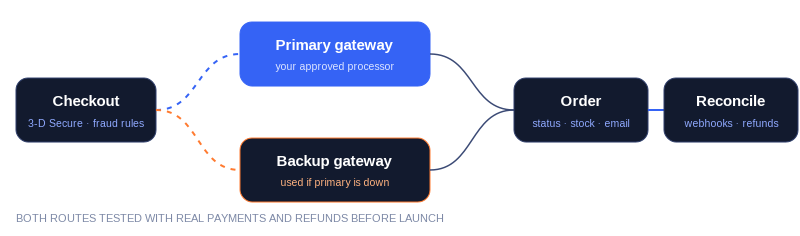
Set up new gateways or fix the ones that are misbehaving on WooCommerce and WordPress: Stripe, PayPal, Square, regional and high-risk processors, with every payment path tested.
Tell us what is happening and we will reply with a clear next step.
Payment gateway integration is connecting a payment provider such as Stripe, PayPal or Square to your WooCommerce or WordPress site, configuring it for your account, currencies and security settings, and testing that payments, refunds, subscriptions and webhooks update orders correctly.
A gateway that looks fine in test mode can still fail in quieter ways: webhooks that never arrive, orders stuck on “pending”, refunds that don’t update stock, or 3-D Secure screens that break on phones. We set gateways up properly and fix the ones that are misbehaving.
Cards, wallets such as Apple Pay and Google Pay, and local payment methods.
PayPal checkout, Pay Later where available, and card processing.
Online payments synced with in-person sales and stock.
Providers for the UAE, UK, Canada and elsewhere that offer a WooCommerce integration.
For businesses a mainstream provider won’t support, using the processor that approved you.
Providers without a plugin, built from their documented API.
Check the gateway account settings, plugin versions, logs and recent failed orders.
Set up or repair the gateway in test mode on a staging copy.
Payments, failures, refunds, subscriptions and webhooks, on desktop and mobile.
A live low-value order and refund, then monitor the first real orders.
We use hosted payment fields or redirects from the provider, so card numbers go straight to the gateway and never touch your server. That reduces your PCI scope, though your provider should confirm exactly what still applies to you. We never ask for or store your gateway passwords; you add API keys yourself or through a secure handover, and accounts stay in your business’s name.
We don’t give advice on tax, fees or which provider is cheapest. We’ll configure the provider and settings you choose.
Some products, including research peptides, supplements and CBD, are restricted by mainstream providers. If that’s you, we integrate the processor that has approved your business and set up a tested backup. For peptide stores specifically, see peptide payment gateway integration.
An account in your business’s name, with API access enabled.
An admin account on the website and hosting access for logs.
Currencies, countries, subscriptions and refund rules.
Usually because the gateway’s webhook isn’t reaching your site, so WooCommerce never hears that the payment succeeded. Firewalls, caching and incorrect webhook secrets are common causes.
Yes, through gateways that support them, such as Stripe. They need a verified domain and HTTPS.
Yes, with WooCommerce Subscriptions or the gateway’s own billing, including renewals, failed payment retries and card updates.
Yes. Many stores offer cards plus PayPal, and high-risk stores benefit from a tested backup gateway.
Not with the setups we use. Card details are entered into the provider’s hosted fields and go straight to them.
Yes: donation forms, booking plugins, membership plugins and custom checkouts.
info@webexpert.solutions · +92 345 7723858 · Faisalabad, Pakistan · Serving the UAE, US, UK & Canada