Rescue & repair · Malware removal

WordPress malware removal that finds the way in, not just the symptoms.

If your site is redirecting visitors, showing spam in Google, or your host has suspended it, we contain the damage, clean files and database, close the backdoors attackers leave behind, and harden the site so the same hole can’t be used twice.

Symptom checker

What have you noticed?

Tick anything you have noticedThis checker is a guide, not a diagnosis.

What malware removal actually involves

In short

WordPress malware removal means finding every piece of malicious code in the site’s files and database, removing it, closing the way the attacker got in, and requesting reviews from Google and anyone else who flagged the site. Deleting the visible symptom isn’t enough. If the entry point stays open, the infection usually comes back.

Most hacked WordPress sites weren’t targeted personally. Automated tools scan the internet for known weaknesses: an outdated plugin with a published vulnerability, a reused admin password, a forgotten test install in a subfolder. When they find one, they plant code that earns the attacker money: spam pages that borrow your search rankings, redirects to scam sites, or scripts that skim card details at checkout.

The visible damage is usually the smallest part. Attackers almost always leave backdoors, small files or database entries that let them back in after you clean up. That’s why a cleanup that only removes what you can see often fails within days.

Signs your site has been hacked

Some symptoms are obvious. Others are deliberately hidden from you: many infections show spam or redirects only to visitors arriving from search results, or only on mobile, so the site looks fine when you check it from your own desktop.

What you noticeWhat’s usually behind it
Redirects to scam, pharmacy or adult sitesInjected JavaScript, rewritten .htaccess rules or malicious entries in the database
Search results show spam titles or Japanese textAn SEO-spam infection generating pages that are shown to Google but hidden from you
“This site may be hacked” or “Deceptive site ahead”Google has detected hacked content or phishing pages on the domain
New administrator accounts you didn’t createThe attacker added a way back in through WordPress itself
Host suspension or malware noticeThe host’s scanner found malicious files, or the site is sending spam
Sudden slowdown, unexplained server load or outgoing spamMalicious scripts running in the background, such as spam mailers

Check yourself: open the Security issues report in Google Search Console, search Google for site:yourdomain.com and look for pages you don’t recognise, and view your site on a phone using mobile data rather than your office Wi-Fi.

For a fuller checklist, read our guide on how to tell if your WordPress website has been hacked.

What to do in the first 30 minutes

If it's happening right now

Limit the damage, keep the evidence

These steps reduce harm without destroying the clues we need to find the cause. Then send an urgent request.

01
Don't delete or reinstall the site yet.

Wiping it removes the trail that shows how the attacker got in, and reinstalling WordPress doesn’t clean the database.

02
Take a copy as it is now.

A full backup of files and database, infected or not. It’s evidence, and a safety net if a cleanup step goes wrong.

03
Change passwords from a clean device.

Hosting account first, then WordPress administrators, SFTP/FTP and the database user.

04
Look at Users in WordPress.

Note any administrator you don’t recognise, but don’t delete them yet; when they were created helps date the attack.

05
Write down what you've seen.

Screenshots of redirects and warnings, with the time, plus any emails from your host or Google.

Our cleanup process, step by step

The order matters. Cleaning before investigating destroys evidence; patching before cleaning leaves backdoors in place. Every cleanup follows these eight steps.

01

Contain

Take a forensic backup, put up a maintenance page if visitors are being harmed, and lock down compromised accounts.

02

Investigate

Review access logs, file modification dates, user accounts and scheduled tasks to establish when and how the attacker got in.

03

Clean the files

Replace WordPress core with verified copies, compare plugins and themes against the original versions, and remove injected code and rogue files.

04

Clean the database

Search posts, options, widgets and user meta for injected scripts, spam links and hidden redirects that file scanners never see.

05

Close every door

Remove web shells and rogue administrators, rotate WordPress security keys, and reset every credential the attacker could have seen.

06

Patch and harden

Update or replace the vulnerable component, correct file permissions, disable file editing in the dashboard and add a firewall where appropriate.

07

Request reviews

Once the site is clean, request a review in Search Console’s Security Issues report and with any host or blocklist that flagged the site.

08

Report and monitor

Watch for file changes after the cleanup, and send you a written report: the likely cause, what was removed, and what to change.

Common infections, and where they hide

InfectionWhat you seeWhere it usually hides
Malicious redirectsMobile or search visitors land on scam sites.htaccess, injected JavaScript, wp_options
Japanese keyword / SEO spamThousands of spam pages indexed under your domainRogue PHP files, fake sitemaps, cloaking rules
Backdoors and web shellsOften nothing, until the site is reinfectedUpload folders, fake plugin files, theme files
Rogue administratorsAdmin users you didn’t createwp_users, sometimes hidden from the user list
Card skimmers (WooCommerce)Customers report fraud after buying from youCheckout scripts, payment plugin files, database
Phishing kits“Deceptive site ahead” warnings, host noticesExtra folders that imitate a bank or login page

Why the database matters. Security plugins and server scanners mostly look at files. Many redirect and spam infections live in the database instead, inside posts, widgets or site options, and come back the moment a cache is cleared. A cleanup that doesn’t search the database is incomplete.

The part most cleanups miss

Why cleaned sites get reinfected

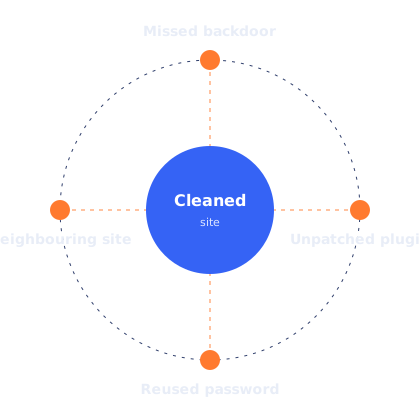
Four routes to reinfection around a cleaned site: missed backdoor, unpatched plugin, reused password, neighbouring site in the same hosting account
Four routes back in

If any of these four routes stays open, the infection usually returns:

  • A missed backdoor. A small file or database entry that looks like ordinary code.
  • The original vulnerability. The outdated plugin or theme is still installed and still exploitable.
  • Stolen credentials. A hosting, SFTP, database or admin password the attacker captured still works.
  • A neighbouring site. Another website in the same hosting account is infected and spreads through shared folders.

Our process closes all four. If you have other sites in the same hosting account, we’ll check them too, or tell you plainly that they need checking.

If you run a WooCommerce store

Stores need extra care because the stakes include your customers’ payment details.

  • We check checkout pages, payment plugin files and the database for card-skimming scripts, which copy card details as customers type them.
  • We review recent orders and admin activity for signs of tampering.
  • If there’s evidence that card data may have been exposed, we’ll tell you clearly. Whether and how to notify customers or your payment provider is your decision, and may have legal requirements depending on where you and your customers are, so we’ll give you the facts you need to make it.

Most stores using hosted payment fields (where the card form is served by the payment provider) are less exposed, but injected scripts can still interfere with checkout, so we check every store the same way.

What we'll need from you

Hosting or SFTP access

To inspect and replace files and read the server’s access logs.

A WordPress administrator account

Created just for us, so you can remove it when we’re done.

Google Search Console access

If Google is warning visitors, so we can request the review.

Your timeline

What you noticed and when, plus screenshots and any host emails.

What a cleanup can and can't do

Honest limits

What a cleanup can't do

  • No one can guarantee a site will never be attacked again. Hardening and maintenance make it much harder.
  • We can’t recover content that was deleted and exists in no backup.
  • Google lifts warnings after reviewing the site on its own timeline. We can request the review; we can’t speed it up.
  • Spam pages can take time to drop out of search results after they’re removed.
  • If the site runs on very old, unsupported software, a cleanup may need to be followed by updates or a rebuild to stay clean.

An example cleanup

Illustrative scenario

A small business site redirecting mobile visitors

The owner of a WordPress site hears from a customer that the site “goes to a weird page” on their phone. On desktop, everything looks normal.

The investigation finds a redirect script injected into the database’s site options, triggered only for mobile visitors arriving from Google, plus two backdoor files in the uploads folder. Access logs point to an outdated form plugin with a known vulnerability, last updated two years earlier.

The cleanup removes the database entry and backdoors, replaces WordPress core and every plugin with verified copies, removes the abandoned plugin and rebuilds the form with a maintained one, rotates all passwords and keys, and requests a review in Search Console. The owner receives a short report and a recommendation to move to a monthly maintenance plan so plugins don’t fall behind again.

Composite example to explain the process. Not a specific client.

Common mistakes to avoid

Frequently asked questions

It depends on the size of the site, the type of infection and how quickly we get access. We’ll give you a realistic estimate after the first review rather than a promise we can’t keep.

Sometimes, if you’re sure the backup predates the infection and you also close the way in. Otherwise you restore the vulnerability too. We often use a clean backup as part of the cleanup, not as the whole of it.

Security plugins are useful for scanning and firewalling, but they mostly catch known patterns in files. Database injections, new backdoors and infections outside WordPress often need manual investigation.

Once the site is clean, we request a review through Google Search Console’s Security Issues report. Google removes the warning after its own review; we can’t control how long that takes.

Removing spam pages and warnings removes the cause of the damage. How quickly rankings return depends on how long the infection was live and how Google reprocesses the site. It isn’t something anyone can guarantee.

How incident cleanup is handled depends on the plan, and it’s set out in writing before you start. See website maintenance.

Our cleanup process is built around WordPress and WooCommerce. For other platforms, contact us and we’ll tell you honestly whether we’re the right people.

Tell us what you're seeing. We'll tell you what it is.

info@webexpert.solutions · +92 345 7723858 · Faisalabad, Pakistan · Serving the UAE, US, UK & Canada