
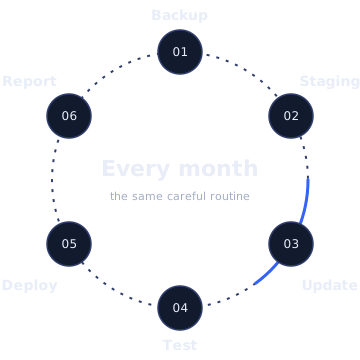
Updates applied on staging first, off-site backups you can restore from, uptime and security monitoring, and a plain-English report, so problems are caught before your customers find them.
Tell us what is happening and we will reply with a clear next step.
Website maintenance is the routine work that keeps a site secure and working: applying updates safely, taking and testing backups, monitoring uptime and security, and fixing small problems before they reach customers, with a report each month so you know what was done.
A WordPress site is made of parts maintained by different people: WordPress core, your theme and every plugin. Each one releases updates for security fixes, compatibility and new features. Skipping updates leaves known vulnerabilities open; most hacked WordPress sites we see were running outdated plugins. Applying updates blindly causes the other common emergency: an update that breaks the layout or the checkout, discovered by a customer.
Maintenance sits between those two: updates applied regularly, but tested first, with a backup to roll back to.
If any of these sound familiar, the site is probably running on borrowed time:
None of these is an emergency on its own. Together, they’re how most of the emergencies we’re called about begin.
WordPress core, theme and plugin updates, applied on a staging copy and checked before going live.
Automatic backups stored away from your server, kept for an agreed period, with periodic test restores.
Your site is checked around the clock; if it goes down, we’re alerted and investigate.
Malware and vulnerability scanning, login protection, and alerts when a plugin you use has a known flaw.
Certificate expiry and domain renewal dates watched, so neither lapses unnoticed.
A plain-English summary of what we did, what we found and what we recommend.
A fresh backup of files and database before anything changes.
Updates applied to a private copy of your site first.
Home, key templates, forms, search, login, and for stores, cart and checkout.
Tested updates applied to the live site at a quiet time for your visitors.
A quick check of the live site after deploying, including caching layers.
What changed, anything held back and why, and anything that needs a decision.
Every site is different, so plans are matched to what your site needs (a five-page brochure site and a busy store need different levels of care). After a short review we’ll recommend a plan and put its inclusions, response expectations and price in writing.
Common add-ons, depending on the site:
Developer time each month for content changes, fixes and small improvements. See ongoing support.
Test orders through checkout after updates, and order-email checks.
Regular Core Web Vitals review and fixes for regressions.
Monthly review of indexing and coverage issues, flagged in your report.
The first month is different from the rest, because we need to understand the site before we can look after it:
Versions, plugins, theme, hosting, PHP, backups, access, and anything abandoned or risky.
A full off-site backup before we change anything, kept as the starting point.
A staging copy for testing updates, uptime and security monitoring, and alerts to the right people.
Outstanding updates applied in stages on staging, with anything risky discussed with you first.
The pages, forms and journeys we’ll test after every update, specific to your site.
Stores need more than brochure sites. WooCommerce extensions (payment gateways, shipping, subscriptions) update often and interact closely, and a broken checkout costs money by the hour. For stores we test a real or test order through checkout after updates, check that order emails send, watch for template overrides in the theme that fall out of date, and schedule updates around your busiest trading times rather than in the middle of them.
You’ll get a short report each month. Here’s the layout. Content is specific to your site.
Which core, theme and plugin updates were applied, tested on staging first, and anything held back with the reason.
Backup schedule, where copies are stored, and the result of any test restore.
Any downtime detected, how long it lasted and what caused it.
Scan results, blocked attacks worth knowing about, and anything that needs a decision.
Fixes and changes made, if your plan includes support time.
Plain-English suggestions for next month, such as plugins to replace or PHP upgrades coming up.
We’re based in Pakistan (UTC+5), which works in your favour for maintenance. For US and Canadian sites, updates can be deployed overnight your time, when the fewest customers are browsing. For UK sites, changes can be made early in your day with time to watch for anything unusual. For UAE sites, which share almost our whole working day, we agree a quiet window with you in advance.
To keep plans predictable, these are quoted separately unless your plan says otherwise:
Incident response, such as a malware cleanup, depends on the plan. It’s spelled out in writing before you start, so there’s no ambiguity on a bad day.
In a typical month: eleven plugin updates and a WordPress minor release are applied on staging. One update to a slider plugin changes how images crop on mobile, so it’s held back, the issue is reported to the developer, and the report recommends replacing the plugin. Backups run daily; one is restored to staging to confirm it works. Uptime monitoring records a five-minute outage at the host, which is noted. The security scan is clean. The report suggests upgrading PHP before the host retires the current version.
Composite example to explain the process. Not a specific client.
Want to do it yourself? Our maintenance checklist covers what to check and how often.
For updates, scanning and reporting.
To set up staging, backups and monitoring.
One or two people who should hear about issues.
Key pages, forms and journeys to test after updates.
It depends on the site’s size and complexity. A small brochure site needs less than a busy store. We’ll recommend a plan after a short review and put the price in writing.
You can, but nobody checks whether an update broke something, and there may be no recent backup to roll back to. Maintenance adds the testing and the safety net.
Yes. We start with a review and a full backup, and tell you about anything risky before we take it on.
That’s what staging is for: we catch it before it goes live. If something does slip through, we roll back from the backup and fix it.
Notice periods and terms are set out in writing before you start.
Yes, with extra checks: test orders through checkout after updates, and attention to payment and shipping extensions.
info@webexpert.solutions · +92 345 7723858 · Faisalabad, Pakistan · Serving the UAE, US, UK & Canada