
Rescue & repair · Bug fixes

Website bug fixes for errors, conflicts and things that suddenly stopped working.

Critical errors, white screens, broken layouts, plugin conflicts, checkouts that fail and forms that don’t send. We find the cause on a staging copy, fix it properly, and tell you what happened.

Error decoder · what it usually means

A PHP fatal error, usually from a plugin, theme or PHP version change. WordPress emails the admin with the file responsible, and the debug log names it.

Usually the same as a critical error with error display turned off. The server’s PHP error log tells us what failed.

Often a caching or CSS-optimisation plugin serving old files, or a page builder and theme now out of step.

Permalink rules not regenerated, or a migration left old URLs without redirects.

Usually email delivery rather than the form: missing SPF/DKIM, or the host blocking PHP mail.
What website bug fixing covers

In short

Bug fixing means finding why something on your website stopped working (an error, a broken layout, a form that doesn’t send, a feature that misbehaves) and fixing the cause, not just the symptom, without breaking anything else in the process.

Most WordPress problems come from the way its parts interact: WordPress core, a theme, a dozen or more plugins, a PHP version chosen by your host, and caching layers on top. An update to any one of them can change how the others behave. That’s why the same error message can have very different causes on two different sites, and why guessing rarely works.

This page is for application-level problems: things going wrong inside the website. If the whole server is failing (500, 502 and 503 errors, resource limits, timeouts), see server troubleshooting. If the site is behaving like it’s been hacked, start with malware removal.

Problems we fix most often

ProblemUsual causeFirst thing we check
“There has been a critical error”PHP fatal error in a plugin or themeThe PHP error log and WordPress recovery-mode email
White screen of deathFatal error with display turned off, or memory exhaustedServer error log, PHP memory limit
Layout broken after an updateStale cache, CSS/JS optimisation, builder–theme mismatchClear caches, disable optimisation on staging
Admin dashboard won’t loadPlugin conflict in admin, or exhausted memoryDisable plugins on staging, check logs
Forms not sendingEmail delivery: SPF/DKIM missing, PHP mail blockedMail logs, DNS records, SMTP settings
Checkout errors in WooCommercePayment gateway or shipping plugin conflict, outdated templatesWooCommerce status report and logs
Pages 404 after a changePermalinks not flushed, missing redirectsRewrite rules, redirect map
“Briefly unavailable for scheduled maintenance”An update stopped part-wayThe .maintenance file and the update that failed

How we diagnose, instead of guessing

Every fix starts with evidence. We read the PHP and server error logs, enable WordPress debug logging where it’s safe to do so, and reproduce the problem on a staging copy so we can test without affecting customers.

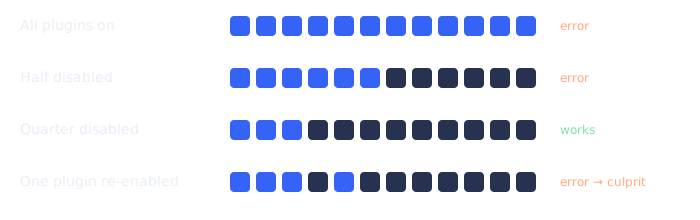
For conflicts, we isolate the cause methodically. Disabling plugins in halves on the staging copy narrows dozens of suspects down to the culprit in a few steps, instead of one at a time on the live site.

Isolating a plugin conflict on a staging copy by disabling plugins in halves until the error disappears, then re-enabling one at a time
Finding a plugin conflict by halving, on staging

Once we know the cause, we choose the fix that’s least likely to cause new problems: a configuration change, an update, a small code patch, or replacing an abandoned plugin with a maintained one. Then we test the affected pages and the ones most likely to be knocked on: forms, checkout, login and search.

PHP version problems

Hosts regularly retire old PHP versions, and WordPress, themes and plugins move on too. Running an old PHP version is a security risk; jumping to a new one can break older code. Both problems show up as critical errors or features quietly failing.

We check your current PHP version against what WordPress recommends and what your theme and plugins support, test the upgrade on staging, fix or replace anything that breaks, then switch the live site. If a plugin is no longer maintained and won’t run on a supported PHP version, we’ll tell you and suggest alternatives rather than holding the whole site back.

When forms and emails stop arriving

“The form doesn’t work” is one of the most common requests we get, and in most cases the form is fine. The message is created, but the email is rejected or filtered on the way. Modern mail providers expect email to be authenticated with SPF and DKIM records, and many hosts limit or block PHP’s built-in mail function.

We trace the message: does the form create the entry, does WordPress hand it to a mailer, does the mail server accept it, is it rejected or sent to spam? Then we fix the weak link, usually by sending through a proper SMTP or transactional email service with the right DNS records. The DNS side is covered in more detail on hosting, domain and DNS management.

One-off fix or ongoing support?

One-off fix

For a specific problem
  • Fixed scope: one problem, diagnosed and fixed
  • Written note of the cause and the fix
  • Ideal when the site is otherwise looked after

Ongoing support

For sites that keep needing help
  • Developer hours each month for fixes and changes
  • We already know the site, so fixes are faster
  • Pairs well with a maintenance plan

If you’re fixing something every few weeks, the underlying issue is usually maintenance: outdated plugins, no staging, no testing. Ongoing website support is usually cheaper than repeated emergencies.

What we'll need from you

A WordPress administrator account

Created for us and removed when we’re done.

Hosting or SFTP access

To read error logs and create a staging copy.

Steps to reproduce it

What you clicked, on which page, on which device and browser.

When it started

And anything that changed around then: updates, new plugins, host changes.

An example fix

Illustrative scenario

A store whose checkout broke after updates

A WooCommerce store applies a batch of plugin updates. Afterwards, customers can add products to the cart, but checkout shows an error and orders stop arriving.

On a staging copy, the error log shows a fatal error in an older shipping-rate plugin calling a function that a WooCommerce update had removed. Isolating plugins confirms it. The plugin’s developer has released a compatible version; it’s applied and tested on staging with test orders through each shipping method and payment gateway, then deployed. The owner is told which plugin caused it and why testing updates on staging first would have caught it.

Composite example to explain the process. Not a specific client.

Mistakes that make things worse

Frequently asked questions

Yes. We’ll review how it’s put together first, and tell you if we find anything risky beyond the problem you asked about.

The written scope says how diagnosis is handled. For defined problems we quote a fixed price; for intermittent or unclear issues we agree a diagnosis stage first.

That’s exactly why we work on staging and test the pages most likely to be affected before deploying.

Yes, including layouts broken after updates, conflicts with themes, and performance problems caused by builders.

Often caching (you see a logged-in, uncached version), a browser extension, or something device-specific. Occasionally it’s malware that hides from logged-in users. We’ll check which.

Tell us what you're seeing. We'll tell you what it is.

info@webexpert.solutions · +92 345 7723858 · Faisalabad, Pakistan · Serving the UAE, US, UK & Canada