Move & migrate · Shopify to WordPress

Shopify to WooCommerce migration, planned around your products, customers and URLs.

Products and variants, customers and order history where supported, rebuilt design and checkout, and a one-to-one redirect for every Shopify URL. Tested with real orders before you switch.

Shopify → WooCommerce
Moves with the data
  • Products & variants
  • Customers
  • Order history*
Rebuilt or reconfigured
  • Design
  • Apps → plugins
  • Checkout
Can't move
  • Passwords
  • Saved cards

*Where supported.

Is WooCommerce right for your store?

In short

A Shopify to WooCommerce migration moves your store’s products, customers and, where supported, order history from Shopify to WordPress with WooCommerce, rebuilds the design and features on WordPress, and redirects every Shopify URL to its new address.

Businesses usually move for control: owning the platform and data, avoiding per-transaction fees on third-party payment gateways, editing content without workarounds, or building features that Shopify apps make expensive. Shopify is a good platform, and moving isn’t right for every store. WooCommerce means you (or someone like us) are responsible for hosting, updates and security.

Stay on Shopify if…

Fully hosted is the priority
  • You want hosting, security and updates handled entirely by the platform
  • Your store relies on Shopify-only features or apps with no WordPress equivalent
  • You have no budget for ongoing maintenance

Move to WooCommerce if…

Control and flexibility matter
  • You want to own the platform, data and hosting
  • Content and SEO matter as much as products
  • App subscription costs or transaction fees have grown
  • You need custom features or integrations

Still deciding? Our guide on Shopify to WooCommerce covers costs and trade-offs in more depth.

What transfers, what's rebuilt, what can't move

Shopify → WooCommerce
Moves with the data
  • Products, variants and options
  • Product images and descriptions
  • Collections as categories
  • Customer accounts and addresses
  • Order history (as records)*
  • Pages and blog posts
  • SEO titles and descriptions
Rebuilt or reconfigured
  • Theme and design
  • Apps → plugins
  • Discount and promotion rules
  • Shipping zones and rates
  • Tax settings
  • Checkout and email templates
  • 301 redirect map
Can't move
  • Customer passwords
  • Saved payment methods
  • Data held inside Shopify apps
  • Shopify Payments setup and payout history
  • Shopify-only features

*Historical orders are imported as records for reference and customer accounts; they aren’t live payment transactions. What’s exportable depends on your Shopify plan and apps, confirmed during scoping.

Products and variants

Shopify and WooCommerce model products differently. Shopify products have up to three options (such as size and colour) generating variants; WooCommerce uses variable products with attributes. We map options to attributes, carry across SKUs, prices, compare-at prices, stock levels, weights and images, and check a sample of products variant by variant.

Metafields, product reviews and bundles usually live in Shopify apps. Each needs a decision: import into a WooCommerce equivalent, rebuild, or leave behind. We list them all during scoping so nothing is a surprise.

Customers, passwords and order history

Customer accounts and addresses can be imported. Passwords can’t: Shopify stores them as one-way hashes that WooCommerce can’t use, so customers set a new password the first time they log in. We prepare a clear, friendly email for you to send at launch, and make the reset flow easy.

Saved payment methods can’t be transferred between platforms either. Customers re-enter card details at their next purchase. If you sell subscriptions, that needs particular planning, because recurring payments are tied to the payment provider and the subscription app.

Shopify's fixed URL patterns

Redirecting Shopify URLs

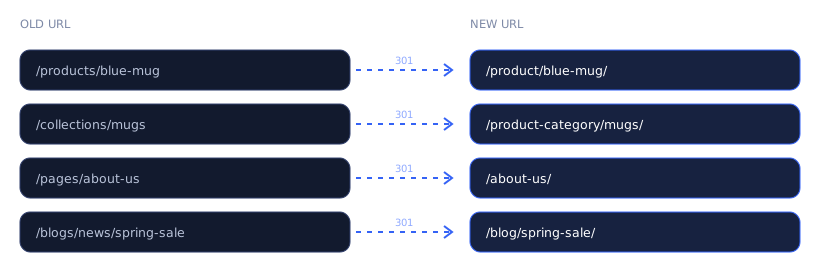
Old URLs mapped one-to-one to new URLs with 301 redirects
Shopify URL patterns mapped to WooCommerce

Shopify uses fixed prefixes like /products/, /collections/, /pages/ and /blogs/news/. WooCommerce’s defaults differ. We export every product, collection, page and post URL from Shopify, crawl the live store for anything else with traffic or links, and write one-to-one 301 redirects. Product-in-collection URLs (/collections/x/products/y) are redirected too, since they often appear in search results.

Apps, payments and shipping

Every Shopify app gets reviewed: is it still needed, is there a WooCommerce extension that does the same job, or is it better built into the theme? Common mappings:

On ShopifyOn WooCommerce
Shopify PaymentsStripe, PayPal or another supported gateway
Product reviews appWooCommerce reviews, or a reviews plugin with imported reviews where possible
Email marketing appThe same service’s WordPress integration, in most cases
Subscriptions appWooCommerce Subscriptions or an equivalent, with careful payment migration
Shipping rate appWooCommerce shipping zones, or a carrier-rate extension

Taxes and shipping rules are rebuilt and then tested with real carts across your main zones.

Testing and launch

01

Test orders on staging

Every payment method, shipping zone and coupon type, plus order emails.

02

Compare against Shopify

Spot-check prices, stock and variants against the live Shopify store.

03

Order freeze

A short, planned window where Shopify stops taking orders, so the final import is complete.

04

Final import and switch

New orders and customers since the first import, then the domain switch and redirects live.

05

Watch the first orders

Check that real orders, emails, stock and payments flow correctly in the first days.

Keeping your search visibility

Product and collection pages are often a store’s most valuable search assets. As well as redirects, we carry across each product’s SEO title and meta description, keep product descriptions and image alt text, recreate structured data for products (price, availability and reviews where genuine), and submit a fresh XML sitemap on launch day.

Before the switch we record which pages bring in the most search traffic, and we check those first afterwards, in Search Console and by hand.

Store migration mistakes to avoid

An example migration

Illustrative scenario

A homeware store with 400 products

A store selling homeware has around 400 products, many with size and colour variants, a reviews app and an email marketing integration. The owners want to move to WordPress to publish more content and stop paying for several apps.

Products, customers and two years of orders are imported. Variants are mapped to WooCommerce attributes and checked. Reviews are imported through a plugin that supports the review app’s export. Shipping zones and tax are rebuilt and tested with sample carts. Around 1,100 URLs (products, collections, product-in-collection paths, pages and posts) get one-to-one redirects. After a two-hour order freeze on a quiet evening, the final sync runs and DNS switches; customers receive a password-reset email the next morning.

Composite example to explain the process. Not a specific client.

What we'll need from you

Shopify staff or collaborator access

With permission to export products, customers and orders.

WordPress hosting

Or we’ll recommend hosting suited to your catalogue and traffic.

A list of your apps

And what each one does for you.

Payment gateway accounts

Stripe, PayPal or others, in your business’s name.

Frequently asked questions

No. Accounts are imported, but passwords can’t be. Customers set a new password the first time they log in.

Usually, yes, as historical records linked to customer accounts. Exports can depend on your Shopify plan, which we’ll check first.

If your domain is registered through Shopify, it can be transferred to another registrar or pointed at the new site. We’ll plan that as part of the switch.

No. Keep it until the new store has run cleanly for a while, so you can access data and export anything forgotten.

Sometimes, but not automatically. You pay for hosting, some extensions and maintenance instead of a Shopify plan and apps. Our guide covers the comparison honestly.

Tell us about your website. We'll reply with a clear, written scope.

info@webexpert.solutions · +92 345 7723858 · Faisalabad, Pakistan · Serving the UAE, US, UK & Canada