
Emergency restores from the right restore point, without losing the orders and entries you need, and backup systems that are complete, off-site and tested before the day you need them.
Tell us what is happening and we will reply with a clear next step.
We do two things: restore broken or damaged websites from the right backup, carefully, without losing newer data you need; and set up backup systems that store complete, off-site copies you can actually restore from, tested before you need them.
Almost every site owner believes they have backups. The problems appear when it’s time to use them: the backup only contains files and not the database, it’s stored on the same server that failed, the only copies are from after the problem began, or nobody has ever tried restoring one and the process fails part-way.
If your site is broken right now (a failed update, an accidental deletion, a bad migration, or a hack), a restore can be the fastest route back. It needs care, though, because restoring the wrong thing can make matters worse.
Even a broken site contains data you may need, such as orders or form entries since the last backup.
Locate every available backup (host, plugin, cloud storage) and check what each contains.
Not always the latest. For hacks, it must predate the infection; for failed updates, the last good state.
Where practical, we restore to a copy and check it before replacing the live site.
For stores and membership sites, we bring across orders, users or entries created after the backup.
Restoring without fixing the cause means it can happen again. We tell you what caused it and fix it.
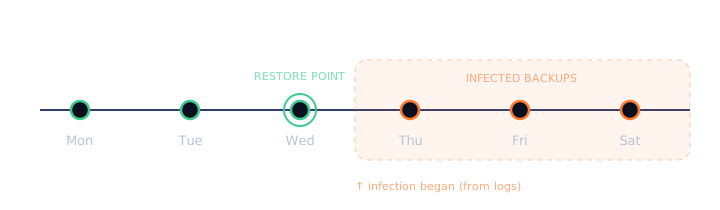
For a failed update, the right restore point is usually the backup taken just before it. For a hacked site, it’s the last clean backup before the infection began, which is often days or weeks earlier than when anyone noticed. Access logs and file dates tell us when that was.
Restoring an older backup means losing changes made since then. On a brochure site that might be one blog post. On a WooCommerce store it could be hundreds of orders, so we plan how to bring that data across before we restore anything.
wp-config.php, .htaccess or server rules, and any custom configuration
A database-only or files-only backup can’t restore a site on its own. It’s one of the most common gaps we find.
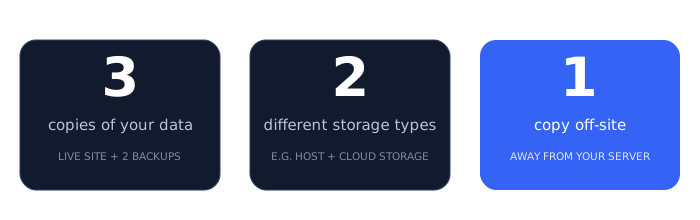
A widely used rule of thumb: keep three copies of your data, on two different types of storage, with one copy off-site. For a website, that usually means the live site, a backup with your host, and a backup in separate cloud storage that isn’t reachable from your web server, so a server failure or compromised hosting account can’t take all of them out at once.
The right schedule depends on how often your site changes and how much you could afford to lose. As a starting point:
| Type of site | Backup frequency | Keep backups for |
|---|---|---|
| Brochure site, rarely updated | Daily, plus before every change | At least 30 days |
| Blog or news site | Daily | 30–90 days |
| WooCommerce store or membership site | More than once a day, or real-time database backups | 30–90 days, with weekly copies kept longer |
| Any site, before updates or changes | A fresh backup every time | Until the change is confirmed good |
Longer retention matters for hacked sites: infections are often discovered weeks after they start, by which point short retention has already rotated out every clean backup.
A backup you haven’t restored is an assumption. As part of setting up backups, and periodically afterwards if you’re on a maintenance plan, we restore a backup to a staging site and check it works: pages load, images appear, logins work, and for stores, products and orders are intact.
We also write down the restore steps for your specific setup, so whoever needs them in an emergency (us, you, or another developer) isn’t working it out under pressure.
Hosting company backups are useful, but check the details: how many days are kept, whether you can restore just the database or just files, whether restores cost extra, and where the backups are stored. If they’re on the same infrastructure as your site, an account suspension, billing problem or compromise can affect both. We treat host backups as one of the three copies, not the only one.
To find existing backups and set up or test new ones.
Your own cloud storage account, so backups stay in your name.
For emergencies: when the site was last working and what’s happened since.
Orders, form entries, member accounts: anything that must not be lost.
Sometimes partially, from host snapshots, caches, search engine copies or the Internet Archive, but results vary and it’s slow. It’s the strongest argument for setting up backups now.
Not if we can help it. Before restoring, we take a copy of the current database and plan how to bring across orders and customers created after the backup.
It depends on your hosting and site size. What matters more is that backups are complete, off-site, retained long enough and tested.
Ideally in cloud storage you own, so you’re never dependent on us or your host to get them.
Often, yes. We can restore a single post, product or table from a backup without rolling back the whole site.
info@webexpert.solutions · +92 345 7723858 · Faisalabad, Pakistan · Serving the UAE, US, UK & Canada