
New host, new platform, new domain or new structure. We inventory every URL, map every redirect, test everything on staging, and switch over in a way that can be undone.
Tell us what is happening and we will reply with a clear next step.
A website migration is any change that moves a site to a new home or changes its addresses: a new host, a new platform, a new domain, or a new URL structure. Done well, visitors and search engines barely notice. Done badly, pages disappear from Google, links break and email stops working.
The work isn’t the copying. It’s the planning around it: knowing every URL that matters, deciding what happens to each one, moving data that platforms don’t export cleanly, testing before anyone sees it, and switching over in a way you can undo. Google’s own site move guidance describes the same principles: map old URLs to new ones, use permanent redirects, and monitor afterwards.
| Migration type | What changes | Main risks |
|---|---|---|
| Hosting move | The server. Domain and URLs stay the same | Data missed in transfer, email records lost, downtime during the DNS switch |
| Platform change | The software, e.g. Shopify, Wix or Squarespace to WordPress | Content that won’t export, features to rebuild, every URL pattern changing |
| Domain change | The domain name | Rankings and links tied to the old domain; needs redirects for a long time |
| Structure change | URL patterns, e.g. a redesign that reorganises pages | Broken internal links and lost rankings if redirects are incomplete |
| Protocol change | HTTP to HTTPS, or www to non-www | Redirect chains, mixed content, duplicate versions indexed |
Many projects combine several, such as a new platform, new host and redesign at once. That’s fine, but every extra change adds risk, so we plan them together and sometimes recommend doing them in stages.
Move the same site to a new host, with files, database, email records and SSL handled in order.
Move a store to WooCommerce: products, customers, order history where supported, and redirects.
Rebuild the design in WordPress, move content and media, and redirect Wix URL patterns.
Use the WordPress export where it helps, rebuild what it misses, and redirect every URL.
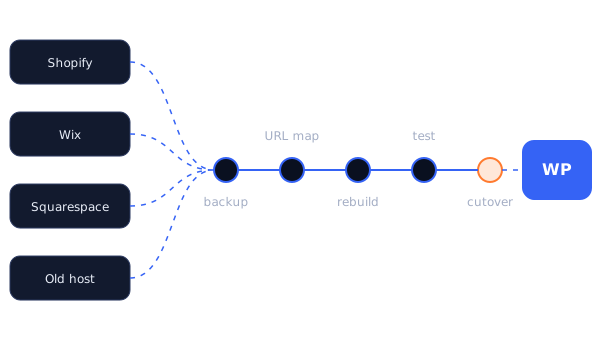
Crawl the current site, export Search Console and analytics data, and list every URL, form, integration and email setting.
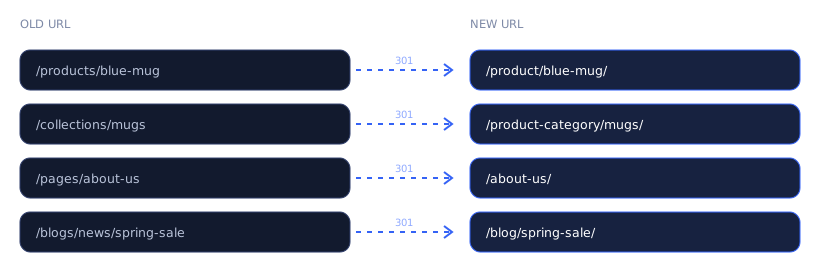
Decide the new address of every page that matters, and write one-to-one 301 redirect rules.
Transfer what exports cleanly; rebuild designs, features and anything the old platform won’t release.
Content, forms, checkout, redirects, metadata, speed and mobile, before anyone outside sees it.
Lower DNS TTL in advance, freeze changes briefly, switch, and keep the old site available for rollback.
Crawl the live site, watch 404s and Search Console, and fix anything that slipped through.
Every page that has search traffic, backlinks or bookmarks needs a new address and a 301 (permanent) redirect from the old one. Redirecting everything to the homepage isn’t a substitute: search engines often treat that like a missing page, and visitors land somewhere irrelevant.

The old site stays live while the new one is built and tested. The switch itself is usually a DNS change, and lowering the DNS TTL a day or two beforehand means most visitors see the new site within minutes, and rolling back is just as quick.
For sites where content changes constantly (stores taking orders, membership sites, busy forums), we plan a short change freeze around the switch so nothing created in the last hour is lost. For everything else, visitors generally don’t notice.
No platform exports everything another platform needs. The specifics depend on the route, which is why each migration page has its own list. In general:
Exact lists depend on the platform, your plan and your apps. Confirmed during scoping.
Any migration that changes URLs carries some risk to rankings, and it’s normal to see some fluctuation for a few weeks while search engines reprocess the site. What causes lasting damage is avoidable: missing redirects, lost page titles and content, blocked crawling on the new site, or a launch that quietly drops pages that were bringing in traffic.
We benchmark before the move (rankings, traffic per page, indexed pages), carry across titles, descriptions, headings and structured data, submit the new sitemap, and compare afterwards. For domain changes we also use Google Search Console’s Change of Address tool, which exists for exactly that situation.
We won’t promise “zero ranking loss”. Anyone who does is guessing. We’ll promise a thorough redirect map, careful testing, and monitoring after launch.
You’ll get a timeline with the written scope, with milestones you can see on the staging site.
An admin or collaborator account on Shopify, Wix, Squarespace or the old host.
Or we can recommend hosting that suits the site.
To benchmark before and monitor after.
Needed only for the switch-over itself.
Some short-term fluctuation is common when URLs change. Lasting losses usually come from missing redirects or lost content, which is what our process is designed to prevent. Nobody can honestly guarantee zero movement.
Not for normal sites: the old site stays live until the switch, which takes minutes with a lowered TTL. Busy stores need a short planned change freeze.
Yes, and it’s often efficient. We’ll plan the redesign so URLs change as little as necessary.
Google suggests at least a year. We recommend keeping them indefinitely if your hosting allows it, as old links keep working forever.
Our process and expertise are built around WordPress and WooCommerce as the destination. For hosting moves, the platform matters less.
info@webexpert.solutions · +92 345 7723858 · Faisalabad, Pakistan · Serving the UAE, US, UK & Canada